---
title: Tracking Materials Quantity Variance in Dynamics AX
description: Typically referred to as matching discrepancy, materials quantity variance is one of the production components that manufacturers use to calculate mishaps
image: https://blog.cfbs-us.com/hubfs/Imported_Blog_Media/materialsquantityvarianceax2012-1.png
---
[](https://cfbs-us.com/)
- [Services](https://cfbs-us.com/services/)
- [Overview](https://cfbs-us.com/services/)
- [ERP Upgrades](https://cfbs-us.com/services/erp-upgrades/)
- [System Consolidation](https://cfbs-us.com/services/system-consolidation/)
- [Methodology](https://cfbs-us.com/services/methodology/)
- [Support & Training](https://cfbs-us.com/services/support-training/)
- [Mobile/Web Development](https://cfbs-us.com/services/mobile-web-development/)
- [Software](https://cfbs-us.com/software/)
- [Overview](https://cfbs-us.com/software/)
- [ProMRO](https://cfbs-us.com/software/promro/)
- [STS Aviation Case Study](https://cfbs-us.com/software/promro/#case-study)
- [Acumatica](https://cfbs-us.com/software/acumatica/)
- [Saddleback Leather Case Study](https://cfbs-us.com/software/acumatica/#case-study)
- [Odoo](https://cfbs-us.com/software/odoo/)
- [Dynamics 365 BC](https://cfbs-us.com/software/dynamics-365-bc/)
- [MemoParts Case Study](https://cfbs-us.com/software/dynamics-365-bc/#case-study)
- [Dynamics 365 F&O](https://cfbs-us.com/software/dynamics-365-fo/)
- [ISV Add-On Products](https://cfbs-us.com/software/isv-add-on-products/)
- [Industries](https://cfbs-us.com/industries/)
- [Overview](https://cfbs-us.com/industries/)
- [Job Shops](https://cfbs-us.com/industries/job-shops/)
- [Manufacturing](https://cfbs-us.com/industries/manufacturing/)
- [Make-to-Order](https://cfbs-us.com/industries/make-to-order/)
- [Maintenance, Repair & Overhaul](https://cfbs-us.com/industries/mro/)
- [Aviation](https://cfbs-us.com/industries/mro/aviation/)
- [Heavy Equipment](https://cfbs-us.com/industries/mro/heavy-equipment/)
- [Projects & Field Service](https://cfbs-us.com/industries/projects-field-service/)
- [Construction](https://cfbs-us.com/industries/construction/)
- [About](https://cfbs-us.com/about-us/)
- [Resources](https://cfbs-us.com/resources/)
- [Resource Library](https://cfbs-us.com/resources/)
- [Blog](https://blog.cfbs-us.com/erp-decision-resources)
- [Events](https://cfbs-us.com/events/)
- [Contact Us](https://cfbs-us.com/contact-us/)

- Services
- [Overview](https://cfbs-us.com/services/)
- [ERP Upgrades](https://cfbs-us.com/services/erp-upgrades/)
- [System Consolidation](https://cfbs-us.com/services/system-consolidation/)
- [Methodology](https://cfbs-us.com/services/methodology/)
- [Support & Training](https://cfbs-us.com/services/support-training/)
- [Mobile/Web Development](https://cfbs-us.com/services/mobile-web-development/)
- Software
- [Overview](https://cfbs-us.com/software/)
- [ProMRO](https://cfbs-us.com/software/promro/)
[STS Aviation Case Study](https://cfbs-us.com/software/promro/#case-study)
- [Acumatica](https://cfbs-us.com/software/acumatica/)
[Saddleback Leather Case Study](https://cfbs-us.com/software/acumatica/#case-study)
- [Odoo](https://cfbs-us.com/software/odoo/)
- [Dynamics 365 BC](https://cfbs-us.com/software/dynamics-365-bc/)
[MemoParts Case Study](https://cfbs-us.com/software/dynamics-365-bc/#case-study)
- [Dynamics 365 F&O](https://cfbs-us.com/software/dynamics-365-fo/)
- [ISV Add-On Products](https://cfbs-us.com/software/isv-add-on-products/)
- Industries
- [Overview](https://cfbs-us.com/industries/)
- [Job Shops](https://cfbs-us.com/industries/job-shops/)
- [Manufacturing](https://cfbs-us.com/industries/manufacturing/)
[Make-to-Order](https://cfbs-us.com/industries/make-to-order/)
- [Maintenance, Repair & Overhaul](https://cfbs-us.com/industries/mro/)
[Aviation](https://cfbs-us.com/industries/mro/aviation/)[Heavy Equipment](https://cfbs-us.com/industries/mro/heavy-equipment/)
- [Projects & Field Service](https://cfbs-us.com/industries/projects-field-service/)
- [Construction](https://cfbs-us.com/industries/construction/)
- [About](https://cfbs-us.com/about-us/)
- Resources
- [Resource Library](https://cfbs-us.com/resources/)
- [Blog](https://blog.cfbs-us.com/erp-decision-resources)
- [Events](https://cfbs-us.com/events/)
- [Let's Talk](https://cfbs-us.com/contact-us/)
Follow Us
-
-
-
-
-
# Tracking Materials Quantity Variance in Dynamics AX
02.17.22
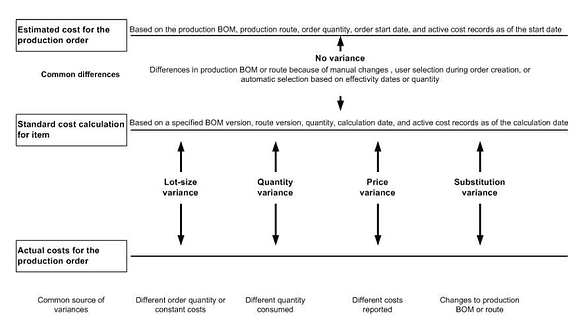
Typically referred to as matching discrepancy, **materials quantity variance** is one of the production components that manufacturers use to calculate the standard cost of products. Allowing businesspeople to assign costs to materials, work, and end products, standard costs represent the predetermined costs of manufacturing single units, being very important for establishing budgets, controlling costs, simplifying costing procedures, developing cost reduction strategies, measuring efficiencies and setting selling prices.
## **Why Use Microsoft Dynamics AX**
Tracking materials quantity variances is impossible without having an industry-specific solution, such as Microsoft Dynamics AX. This system is proficient enough to analyze different types of variances that usually occur when [manufacturing products](http://www.clientsfirst-ax.com/industry/dynamics-production/default.html?__hstc=4800236.9825ff69592d0eb6bc0bcc65e193bbc2.1641954727081.1641954727081.1641954727081.1&__hssc=4800236.270.1641954727082&__hsfp=2406870324). One essential thing to know before attempting to calculate materials variations in Dynamics AX is that no variances will be tracked, calculated and posted until the production order’s status is changed to “Finished.”
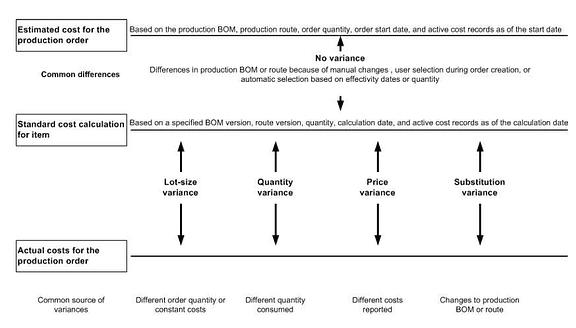
As soon as you complete a production order, you can use this system to track consumption of materials, indirect costs, operations and quantity of end products. Further, Dynamics AX is able to calculate four distinct types of production variances relating to the manufacturing process, such as quantity variance, price variance, [lot size variance](http://www.clientsfirst-ax.com/food-industry-erp.html?__hstc=4800236.9825ff69592d0eb6bc0bcc65e193bbc2.1641954727081.1641954727081.1641954727081.1&__hssc=4800236.270.1641954727082&__hsfp=2406870324) and substitution variance. Although all variances are essential for manufacturing operations, the current article only focuses on **materials quantity variance**.
## **Calculating and Solving Quantity Variance**
This section explains how to use Microsoft Dynamics AX not only to track and calculate quantity variance, but also to resolve it.
### **1.** **Calculate Materials [Quantity Variance](http://technet.microsoft.com/en-us/library/gg242850.aspx)**
In order to track and calculate quantity variance, you must open a special form called **Variance**.
- To access **Variance**, click the **Production** and then, **Production Orders** tabs. Once you open **Production Orders**, you can view the details of any order by simply double-clicking it. After you access the form containing the details you need, click the **Inquiries** then, **Price Calculation** and **Variance** tabs.
- If you wish to get a comprehensive variance report, go to the **Production**, **Reports**, and **Analysis** tabs.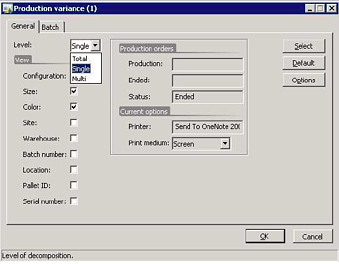
- The **General Tab** of the variance report allows you to view **materials quantity variance** by simply selecting one of the **Level** fields available. **Single Level** reveals variances by operation resource and item; **Multi Level** allows you to access variances based on cost groups; and **Total Level** provides a summary view of all variances.
- **Inventory Parameters** can help you track variances by cost groups. To do this, click **Bills of Materials**, go down to **Cost Control**, then to **Variances to Standard** and choose **Sub ledger**.
By following this short tutorial, you can track and calculate quantity variances in Microsoft Dynamics AX. Now, it’s time to find out how to resolve these variances using the same system.
### **2. Resolve Materials Quantity Variance**
To resolve quantity variances, the **Receiving requirements** box must be checked.
- Go to **Accounts Payable** and open **Vendor Invoices** tab, where your must choose **Common** and then, **Pending Vendor Invoices**. By double-clicking the invoice corresponding to a certain production order, you can access the details regarding that order.
- On the **Action Pane**, open the **Review** tab and then, **Matching Details**, where you’ll find a series of invoices with a warning icon next to them; select the invoice line you want and click **Quantity** to review **materials quantity variance**.
- After checking quantity variance, you can accept – and solve, implicitly – any quantity difference by approving and posting invoices with matching discrepancies. To do this, you have to check the **Approve posting with matching discrepancies** box. An important aspect is that Microsoft Dynamics AX prevents you from posting invoices that include higher quantities of materials than the quantities mentioned on product receipts.
- Access the **Total product receipts matched…** to check whether the receipt quantity matches the invoice quantity or not. If you observe any **materials quantity variance**, go to **Match product receipts to invoice** and choose a receipt that includes the right quantity of materials for that invoice. Don't forget to note the quantity of materials in **Total [product receipts matched](http://technet.microsoft.com/en-us/library/gg213654.aspx)**.
As you’re able to see, Microsoft Dynamics AX is a complex, fully integrated and scalable solution, which can help you grab a dominant market share in the manufacturing sector by simply streamlining specific business operations.
**[](https://blog.cfbs-us.com/cs/c/?cta_guid=0b315d53-7fe8-4aaf-a2c0-52bca80f2529&signature=AAH58kHMXlQsHpEcuK61WqdZF4hJc3OUAw&pageId=1678292948&placement_guid=586e11ae-15c1-453a-8fc4-7523c4d0d247&canon=https%3A%2F%2Fblog.cfbs-us.com%2Fmicrosoft-dynamics%2Fbid%2F341933%2Ftracking-materials-quantity-variance-in-dynamics-ax&portal_id=240423&__hstc=4800236.9825ff69592d0eb6bc0bcc65e193bbc2.1641954727081.1641954727081.1641954727081.1&__hssc=4800236.270.1641954727082&__hsfp=2406870324&hsutk=9825ff69592d0eb6bc0bcc65e193bbc2&contentType=blog-post)**
- [ Share Article](mailto:?subject=Tracking%20Materials%20Quantity%20Variance%20in%20Dynamics%20AX&body=Check%20out%20this%20article:%20https%3A%2F%2Fblog.cfbs-us.com%2Fmicrosoft-dynamics%2Fbid%2F341933%2Ftracking-materials-quantity-variance-in-dynamics-ax)
- [ Back to Articles](https://blog.cfbs-us.com/microsoft-dynamics)
## Related Articles
08.07.26
### [Bridge to Cloud 3 - Dynamics BC](https://blog.cfbs-us.com/microsoft-dynamics/bridge-to-cloud-3-dynamics-bc)
[Read Article](https://blog.cfbs-us.com/microsoft-dynamics/bridge-to-cloud-3-dynamics-bc)
## Ready to take the next step?
[Free Consultation](https://cfbs-us.com/contact-us/)
Our team brings unmatched efficiency and value for a smooth implementation and beyond. Find out how we can help your business gain a competitive advantage in the marketplace.
[Free Consultation](https://cfbs-us.com/contact-us/)

-
-
-
-
-
- Services
- [Overview](https://cfbs-us.com/services/)
- [ERP Upgrades](https://cfbs-us.com/services/erp-upgrades/)
- [System Consolidation](https://cfbs-us.com/services/system-consolidation/)
- [Methodology](https://cfbs-us.com/services/methodology/)
- [Support & Training](https://cfbs-us.com/services/support-training/)
- [Mobile/Web Development](https://cfbs-us.com/services/mobile-web-development/)
- Software
- [Overview](https://cfbs-us.com/software/)
- [ProMRO](https://cfbs-us.com/software/promro/)
- [Acumatica](https://cfbs-us.com/software/acumatica/)
- [Dynamics 365 BC](https://cfbs-us.com/software/dynamics-365-bc/)
- [Dynamics 365 F&O](https://cfbs-us.com/software/dynamics-365-fo/)
- [ISV Add-On Products](https://cfbs-us.com/software/isv-add-on-products/)
- Industries
- [Overview](https://cfbs-us.com/industries/)
- [Job Shops](https://cfbs-us.com/industries/job-shops/)
- [Manufacturing](https://cfbs-us.com/industries/manufacturing/)
- [Maintenance, Repair & Overhaul](https://cfbs-us.com/industries/mro/)
- [Projects & Field Service](https://cfbs-us.com/industries/projects-field-service/)
- [Construction](https://cfbs-us.com/industries/construction/)
- Resources
- [Resource Library](https://cfbs-us.com/resources/)
- [Blog](https://blog.cfbs-us.com/acumatica-cloud-erp)
- [Events](https://cfbs-us.com/events/)
- Contact
- [800.331.8382](tel:8003318382)
- [info@cfbs-us.com](mailto:info@cfbs-us.com)
© 2025 CFBS All Rights Reserved
```json
{
"@context" : "https://schema.org",
"@type" : "BlogPosting",
"author" : {
"@type" : "Person",
"name" : "Andi Conti",
"url" : "https://blog.cfbs-us.com/microsoft-dynamics/author/andi-conti"
},
"dateModified" : "2022-02-17T18:43:53.887Z",
"datePublished" : "2013-10-14T05:00:00.000Z",
"headline" : "Tracking Materials Quantity Variance in Dynamics AX",
"image" : [ "https://blog.cfbs-us.com/hubfs/Imported_Blog_Media/materialsquantityvarianceax2012-1.png" ],
"mainEntityOfPage" : {
"@id" : "https://blog.cfbs-us.com/microsoft-dynamics/bid/341933/tracking-materials-quantity-variance-in-dynamics-ax",
"@type" : "WebPage"
},
"publisher" : {
"@type" : "Organization",
"logo" : {
"@type" : "ImageObject",
"url" : "https://blog.cfbs-us.com/hubfs/cfbs-full-logo-tm.svg"
},
"name" : "CFBS"
}
}
```